A Portal Your Members Will Actually Use
Every member gets their own branded portal — with their profile, directory access, event registrations, community discussions, CE credits, and more. No app to download, no login frustration.
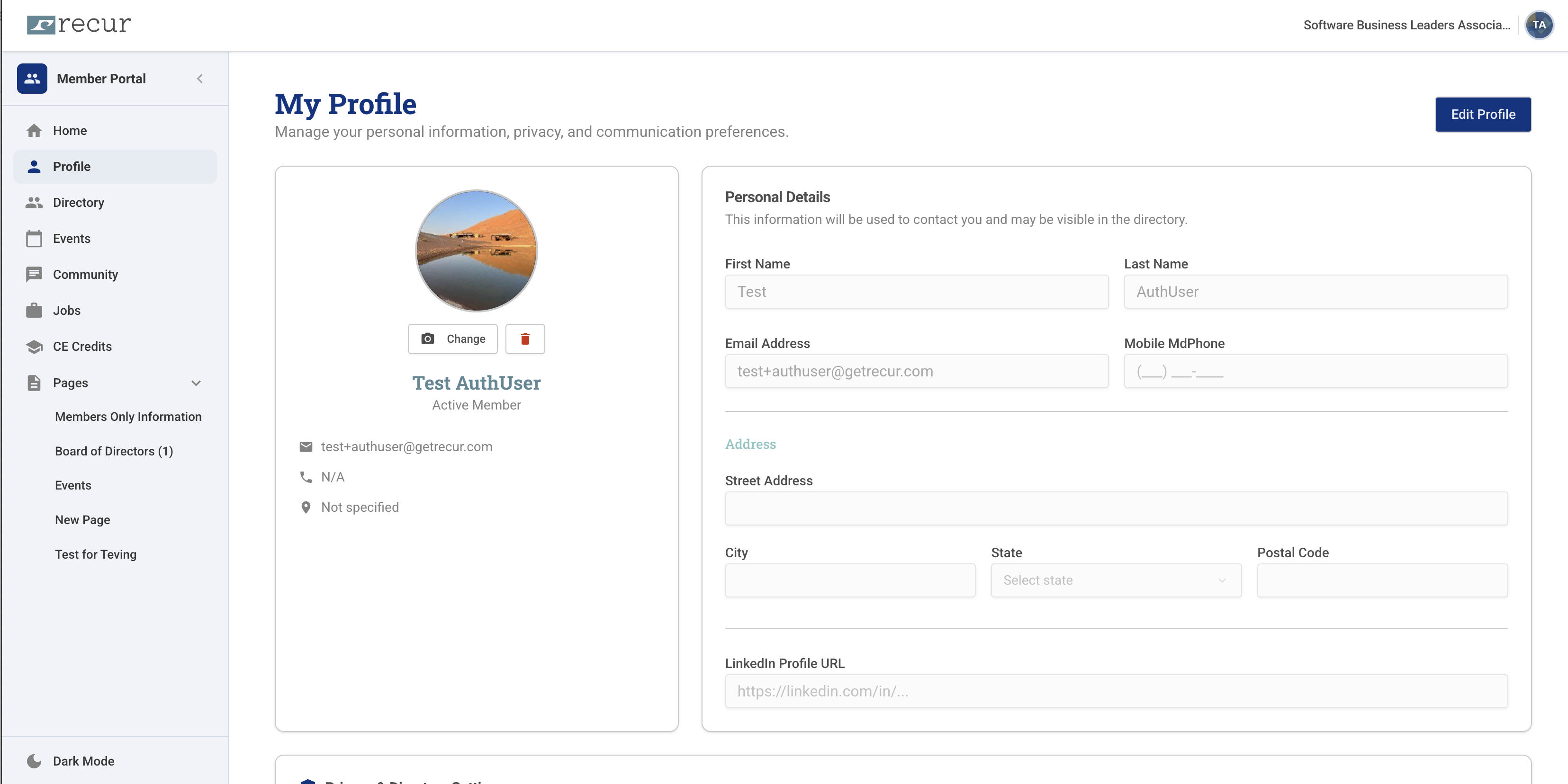
See the full portal experience in your personalized demo
Eight sections. One login. Everything they need.
The member portal sidebar gives every member access to everything they need — all in one place, accessible from any device.
Home
Personal dashboard with renewal status, upcoming events, and announcements
Profile
Members update their own name, address, phone, email, and LinkedIn — keeping your database current
Directory
Searchable member directory so members can connect with peers across the organization
Events
Browse, register, and manage event attendance all from the portal
Community
Discussion forums and member-to-member messaging to build connections
Jobs
Members-only job board to post and discover career opportunities
CE Credits
Track continuing education credits, certifications, and professional development progress
Pages
Custom content pages your admin creates — Members Only info, Board of Directors, announcements, and more
Members keep their own data current
No more chasing members for updated contact info. From the Profile section, each member can update their name, email, mobile number, full address, and LinkedIn profile URL — and upload a profile photo. Changes sync instantly to your admin database.
- Profile photo upload with one-click change
- Personal details: name, email, mobile phone
- Full address (street, city, state, postal code)
- LinkedIn profile URL
- Privacy and communication preference settings
- Membership status visible at a glance (Active Member)
Build any page your members need
The Pages section is fully customizable by your admins. Add a "Members Only" information page, a Board of Directors roster, event recaps, resources, or any content you want members to access. No developer needed — create and publish new pages right from the admin dashboard.
- Members Only information and resources
- Board of Directors roster with photos
- Custom event or announcement pages
- Committee pages and governance docs
- Add unlimited custom pages
Example custom pages
- Members Only Information
- Board of Directors (1)
- Events
- New Page
Pages shown in the sidebar — exactly as they appear to members
Branded for your organization. Comfortable for your members.
Your organization name appears in the portal header. Members toggle dark mode with one click. The experience feels like yours — not like generic software.
White-Labeled
Your organization's name appears in the portal header — the experience feels like yours, not generic software
Dark Mode
Members can switch between light and dark mode with a single toggle in the sidebar
Any Device
The portal is fully responsive — works on desktop, tablet, and mobile without an app download
What it means for your organization
Fewer admin tasks
Members update their own profiles, manage registrations, and access billing — without emailing your office.
Accurate data, always
Self-service profile updates mean your member database stays current without manual follow-up or import/export cycles.
Higher engagement
Community forums, job boards, and CE credits give members reasons to log in between renewals — keeping your org top of mind.
Better retention
Members who feel connected and have easy access to their benefits are significantly more likely to renew year after year.
Your members deserve a better experience — see it in 30 minutes
In a live demo, we'll show you what the portal looks like for members of an organization like yours, walk through every section, and answer your questions in real time.
No commitment. No sales pressure. Just a clear picture of whether Recur is the right fit.